
When a local business owner tells me their website feels slow, I do not begin by installing another optimization plugin. I begin with the customer.
Can someone on a phone see what the business does, open the menu, read the main service information and tap the call or booking button without waiting? If the answer is no, the website has a business problem, not just a technical score to improve.
I have worked in digital marketing for more than 15 years, both on the agency side and as a marketing director. During that time, I have worked with lawyers, dentists, physiotherapists, gyms, software companies and other service businesses. The speed problems vary, but the pattern is familiar: a site slowly accumulates large images, plugins, tracking scripts, pop-ups and design effects until every page is carrying more than it needs.
This guide explains how I approach website speed now, what I measure and where I usually look first on a WordPress site.
Does website speed still matter for SEO?
Yes, but not in the simplistic way it is sometimes presented.
Google says its core ranking systems consider signals that align with a good page experience, including Core Web Vitals. Google also makes an important point that often gets left out: a good score does not guarantee a top ranking, and relevant, helpful content still matters.
That matches what I see in practice. A fast page with weak service information will not suddenly outrank a useful competitor, while strong content is less effective when a customer cannot comfortably use it.
For an Ontario local business, speed can affect the whole path from discovery to enquiry:
- A visitor may arrive from Google Search or a Google Business Profile on a mobile connection.
- They need to confirm the service, location and credibility of the company.
- They may open a menu, compare services, view reviews, call, book or submit a form.
- Each delay or broken interaction creates another reason to leave.
I treat performance as part of conversion optimization, accessibility and technical SEO. It supports the content and the offer. It does not replace them.
What a fast website means in 2026
There is no single "page load time" that explains the entire experience. Google currently uses three Core Web Vitals to describe different parts of it:
- Largest Contentful Paint (LCP) measures how quickly the main visible image or text block appears. A good result is 2.5 seconds or less.
- Interaction to Next Paint (INP) measures how responsive the page is when someone clicks, taps or types. A good result is 200 milliseconds or less.
- Cumulative Layout Shift (CLS) measures unexpected movement while the page is loading. A good result is 0.1 or less.
These thresholds are assessed at the 75th percentile of visits. In plain language, the goal is to provide a good experience for most visitors, including people who do not have the newest phone or fastest connection.
I also look at server response time, total page weight, request count and the time spent running JavaScript. These are useful diagnostic clues, but they are not additional Core Web Vitals.
How I test a local business website
I use PageSpeed Insights as a starting point, not as the final verdict. It can show two different types of information:
- Field data comes from eligible Chrome users over the previous 28 days. It reflects real visits across different devices and connections.
- Lab data is a controlled Lighthouse test. It is useful for finding likely causes, but one test run is not a complete picture of every customer's experience.
Lower-traffic websites may not have enough field data for an individual URL. PageSpeed Insights may then show information for the whole site, or no field data. That is a reporting limitation, not a speed verdict.
I test the mobile and desktop versions of several page types, not just the homepage:
- The homepage
- A primary service page
- A location page
- The contact or booking page
- A blog post that receives organic traffic
I test while logged out of WordPress because caching can behave differently for an administrator. I also use the page on a phone. A report cannot tell me whether a menu feels unreliable or a booking widget is frustrating.
Google Search Console's Core Web Vitals report is useful for monitoring patterns across groups of similar URLs. After a repair, I use a fresh lab test for immediate feedback and then watch field data over time. Real-user reporting is based on a rolling period, so it does not turn green the moment a change is published.
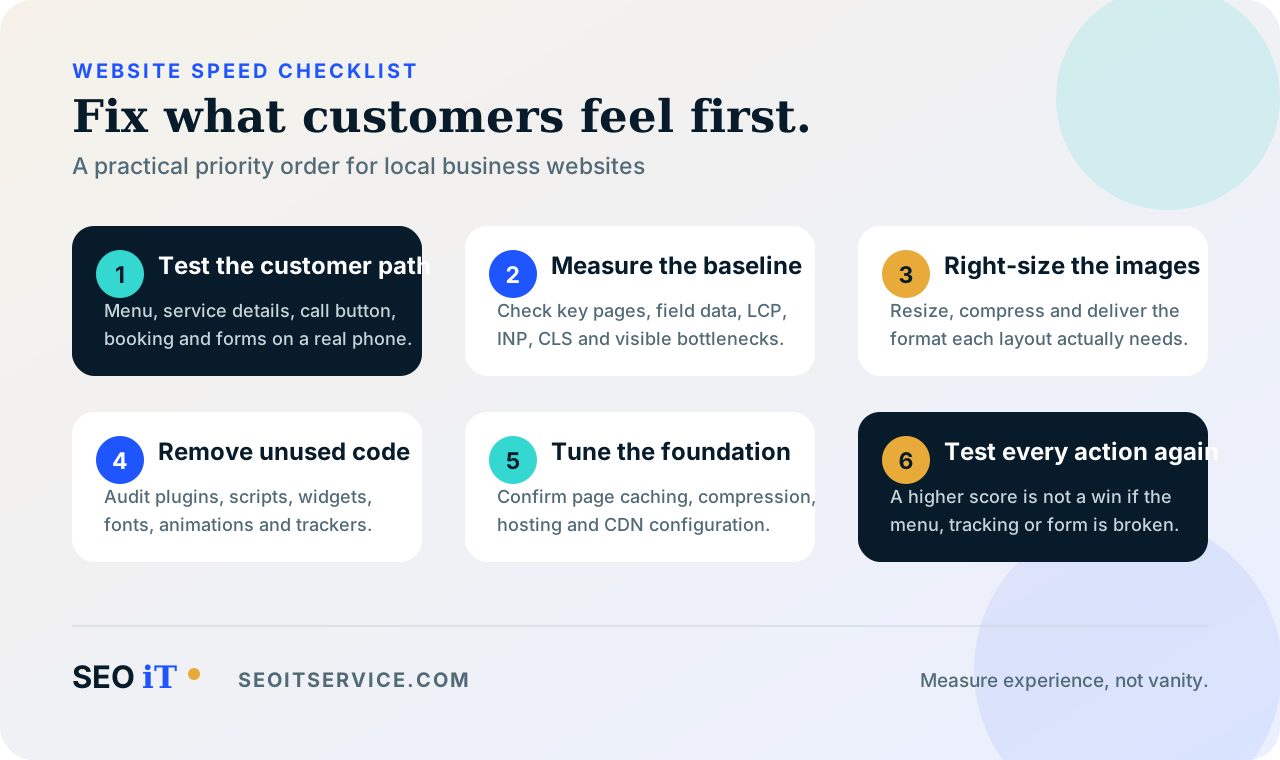
My website speed checklist for WordPress
1. Back up the site and record a baseline
Performance work can change how scripts, styles, images and server responses are delivered. Before touching any of that, I want a current backup and a reliable way to restore it.
I record the starting results for the important pages, including available Core Web Vitals data, the LCP element and visible problems. Without a baseline, it is hard to know whether a change helped.
For a busy site, I prefer to test significant updates in a staging environment. The live website is not the place to discover that combining JavaScript broke the mobile menu or that delaying a spam-protection script stopped the form.
2. Fix the server and caching foundation
WordPress builds pages using PHP and a database. If the server takes too long to begin returning the page, front-end changes can only do so much.
I check whether the site has an effective page cache, appropriate browser caching for static files and modern compression. A page cache can serve a prepared version instead of rebuilding the same public page for every visit. Browser caching can prevent repeat visitors from downloading unchanged assets again.
A content delivery network can deliver static files and reduce pressure on the origin server. It can still be useful for an Ontario business, but its value depends on the host, the site and where visitors are located.
I do not automatically recommend a more expensive server. I first determine whether the delay comes from hosting, an uncached page, a database query or an external service.
3. Deliver images at the size people actually need
Images are one of the first places I look because they are easy to upload at a much larger size than the page displays.
My image checklist is straightforward:
- Resize images for their intended layout instead of uploading the original camera file.
- Compress them with a sensible balance between appearance and file size.
- Use modern formats such as WebP or AVIF where the workflow and browser fallback support them.
- Provide responsive image sources so a phone does not download a desktop-sized file unnecessarily.
- Include width and height information to reserve space and reduce layout movement.
- Lazy-load images farther down the page, not the main image already visible at the top.
Lazy loading everything can delay the LCP image. WordPress includes image loading optimizations, but themes and page builders can change the output. I inspect the page visitors receive rather than trusting a setting.
4. Remove code the page does not need
Plugin count is not a performance score by itself. The real question is what each plugin loads, where it loads and whether the business still needs it.
I review active and inactive plugins, duplicated features and scripts that appear across every page. Sliders, animation libraries, social feeds, heatmaps, chat tools and tag-manager containers deserve particular attention because their cost can extend beyond the initial download.
For scripts that are not needed to display the first screen, defer or carefully controlled delayed loading may help. But I test every critical interaction after changing script timing:
- Main and mobile navigation
- Service dropdowns
- Contact and booking forms
- Cookie consent controls
- Spam protection
- Call tracking
- Analytics events
I have seen optimization settings improve a test score while breaking the action the page exists to generate. A fast form that cannot be submitted is not an improvement.
5. Make the main content easy to render
A browser processes styles, fonts and scripts as it builds the page. Large theme stylesheets, multiple font families and effects above the fold can hold up the main content.
I usually simplify first: remove an unnecessary slider, limit font weights, load only the icons in use and reduce animation. Important brand fonts still need efficient delivery and a sensible fallback.
To improve visual stability, I reserve space for images, videos, cookie notices and embedded widgets. A call button should not jump away just as someone tries to tap it. That is what CLS is designed to help identify.
6. Be selective with maps, reviews and third-party tools
Local business websites often rely on third parties: Google Maps, review widgets, scheduling systems, video players, live chat, analytics and advertising platforms.
These tools can be valuable, but their code is outside the website owner's direct control. I ask whether each feature helps enough customers to justify loading it on that page.
Sometimes I load a map near the viewport, replace an automatic video player with a thumbnail, or limit a booking widget to high-intent pages. I confirm what the business uses, make one controlled change and test it.
7. Keep WordPress current without treating updates as a speed button
Current versions of WordPress, themes, plugins and the server software are important for security, compatibility and ongoing performance work. I back up before major updates and test the site afterwards.
The same care applies to PHP. I do not recommend copying an old version number from an article and switching a production site without preparation. I check the current WordPress requirements, confirm the theme and plugins are compatible, create a restorable backup and test the change.
Database cleanup may help with abandoned plugin tables or unusually large autoloaded options, but I do not delete records without understanding them. Images, scripts, caching or hosting are often the more visible bottleneck.
What I would fix first on an Ontario local business site
If time or budget is limited, I prioritize the pages closest to revenue:
- Make the homepage and main service pages load their core message and call to action quickly.
- Make the menu, phone link, form and booking flow dependable on mobile.
- Optimize the primary images and remove avoidable third-party code.
- Add or correct caching after confirming how the host is configured.
- Repair layout shifts around headings, banners, forms and review sections.
- Check high-impression landing pages in Search Console, not just the pages the owner visits most often.
This order is deliberate. A minor score improvement on a low-traffic archive is less valuable than fixing a slow service page that people reach from search or paid ads.
Website speed mistakes I avoid
Chasing a perfect score
A score of 100 is not a business outcome. I use the report to find real bottlenecks, then check whether the page is faster and easier to use without losing important functionality.
Installing several caching plugins
Overlapping cache and optimization tools can apply competing rules. I choose a setup that fits the server, document it and test the public site after configuration changes.
Lazy-loading the main hero image
The main visible image is often the LCP element. Delaying it can make the most important part of the page arrive later.
Treating AMP as the default mobile solution
AMP is not a general requirement for Google Search. Google indexes AMP pages like other web pages and applies the same standards. For local businesses, I focus on making the primary responsive website fast and dependable.
Removing tools without checking their purpose
A script that looks expensive may handle consent, call attribution, form security or campaign reporting. I confirm ownership and business value before removing it.
Promising rankings or a specific speed result
Performance work should be measured, but no responsible consultant can guarantee a ranking, a perfect score or the same load time for every visitor. Devices, connections, third-party services and page content all vary.
A practical one-hour review
If you want to assess your own site today, this is where I would start:
- Run the homepage, a service page and the contact page through PageSpeed Insights on mobile.
- Write down the LCP element and the largest image or script opportunities.
- Open each page on your phone and use the menu, call button and form.
- Check the WordPress dashboard for outdated core, theme and plugin software.
- Review the plugin list for abandoned or duplicated features, but do not delete anything until you have a backup.
- Check whether the hero image is appropriately sized and not lazy-loaded.
- Look for maps, videos, chat and review widgets loading before they are needed.
- Review Search Console's Core Web Vitals report for groups marked Poor or Needs Improvement.
That review will not solve everything, but it gives you a better brief than "make the score green."
Speed should support the customer journey
The best website speed work is rarely a single switch. It is a series of decisions about what the customer needs now, what can wait and what should not be on the page at all. That same thinking shapes our WordPress web design work and the other services in our search visibility system.
For a local business, I want the value proposition, service area, proof and next step to appear quickly. I want every important interaction to work on a real phone. I also want the site to remain maintainable after the optimization is finished.
If your WordPress site is slow and you are not sure whether the cause is the theme, images, plugins, tracking or hosting, contact SEO iT. I can review the pages that generate enquiries, identify the bottlenecks and recommend changes based on evidence rather than promises.